Questions & Answers

FAQS

Information
about the
software

Everything you need to know about PLACSIM®
to make simulation possible.

It works in local coordinates and is able to simulate the placement of 30-40 elements per minute if the display is accelerated (the pc stores the calculation and only the display is accelerated).

The PLACSIM® simulator needs the following inputs to operate:

.csv file type with initial positions of the elements in columns:

  • 6 Degrees of Freedom of each part (3 position in meters and 3 rotation in radians)
    o Constructive sequence of which it forms part (1, 2, 3…)
    o Order of placement within the construction sequence (1,2,3,4,4,5….)
    o Name of the part (Cube1, Cubipod1…)
  • Type of part: Cube, Cubipod (for the moment). The keywords for are ‘Cube’ and ‘Cubipod’.
  • Nominal diameter in the 3 Cartesian axes in metres

.obj files for the 3D Model:

PLACSIM® automatically generates the last filter layer, so the imported 3D model must be offset by half the nominal diameter of the filter with respect to the plane separating the filter from the mantle.

Thus, when generating the filter, the outer layer of the filter will coincide with the filter-mantle separation plane.
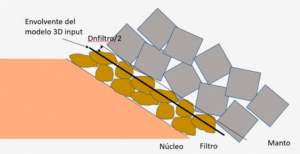
Therefore, the imported 3D model is a ‘pseudo-filter’. This filter layer has a static friction coefficient of 0.6 and a dynamic friction coefficient of 0.5.

  • .csv file type with initial positions of the elements in columns.
  • .obj files for the 3D Model.

The basic steps for using the software are:
1. Generate new file (File/New)
2. Adding the necessary 3D solid layers (Project/Add Layer)
3. Generate filter (Generate filter)
4. Importing the construction sequence (Project/Crane position)
5. Start the simulation (Play button)

The PLACSIM® simulator allows you to export:

.csv file with simulated starting positions:

  • 6 Degrees of Freedom of each part (3 position in metres and 3 rotation in radians)
  • Construction sequence of which it is part (1, 2, 3…)
  • Order of placement within the construction sequence (1,2,3,4,5….)
  • Name of the part (Cube1, Cubipod1…)
  • Part type: Cube, Cubipod (for the time being)
  • Nominal diameter in the 3 Cartesian axes in meters

.csv file with simulated end positions:

  • 6 grados de libertad de cada pieza (3 de posición en metros y 3 de rotación en radianes)
  • Construction sequence of which it is part (1, 2, 3…)
  • Order of placement within the construction sequence (1,2,3,4,5….)
  • Name of the part (Cube1, Cubipod1…)
  • Part type: Cube, Cubipod (for the time being)
  • Nominal diameter in the 3 Cartesian axes in meters

3D model (in ‘.glb’ format). Contains the final state of the simulation, with the final position of each of the elements.

For a correct functioning of the PLACSIM® simulator it is required:

  • Dedicated Graphics Card with at least 2Gb
  • At least 16 Gb RAM
  • CPU equal to or greater than Pentium i7

Manual

Do you have any further questions?

If you need it, our user manual is at your disposal to answer any questions you may have during its use.